
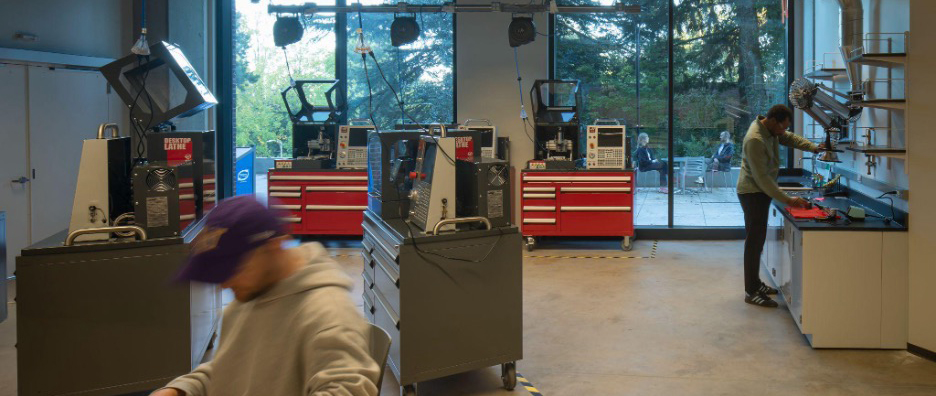
IEB G2 is the College of Engineering's shared fabrication and testing floor on the G2 level of the Interdisciplinary Engineering Building. It is open to all UW Engineering undergraduates who complete Core Floor Safety Training, at no cost, and serves capstone teams, student engineering clubs, coursework, and self-directed projects across all UW Engineering departments.
Contact and hours
Contact
Questions about G2: IEBg2admin@uw.edu
Hours
Monday–Friday: 8:00 AM–10:00 PM, matching IEB building hours.
Closed Saturdays, Sundays, and UW Holidays.
After-hours access (10-11 PM) is available in the Teams & Clubs room and the Assembly & Testing room for users who have completed After-Hours Training.
About G2 spaces
Assembly & Testing room (G220)
Equipment available includes: soldering stations, Bambu Lab 3D printers, ULS laser cutters, Instron load frames, Haas desktop CNC mills and lathes, and project tables.
Fabrication Shop (G222)
A full machine shop: Haas VF-4 5-axis CNC mills, Haas CNC lathes, Bridgeport manual mills, Sharp manual lathes, surface grinder, bandsaws, and inspection equipment. Not yet open to students. The desktop CNC mills and lathes in the Assembly & Testing room are the gateway — completing the desktop workshops is the path to Fabrication Shop training when it opens.
Teams & Clubs room (G210)
A workspace for recognized UW Engineering teams and clubs.
Managed by Kory Dean, IEB G2 Manager and Technical Instructor.
Want to schedule time in G2?
Login with your UW NetID.
IEB schedulerFrequently asked questions
General
Assembly & Testing room (G220): All College of Engineering students, after completing Core Floor Safety Training.
Fabrication Shop (G222): All College of Engineering students, after completing Core Floor Safety Training and additional training. Additional training is not yet available, but will be soon!
Teams & Clubs room (G210): Students in registered student organizations that have been assigned to the IEB space.
No. Just training requirements!
Email IEBg2admin@uw.edu.
Assembly & Testing room (G220):
- 4 soldering stations
- 6 Bambu Lab 3D printers
- 2 ULS R9000 dual-source laser cutters
- 2 Instron load frames (10 kN and 50 kN)
- 3 Haas desktop CNC mills
- 3 Haas desktop CNC lathes
- Project tables
Fabrication Shop (G222):
- 2 Haas VF-4 5-axis CNC mills
- Haas TL-1 and ST-25Y CNC lathes
- 2 Bridgeport manual mills
- 2 Sharp manual lathes
- Clausing surface grinder
- Vertical and horizontal bandsaws
- Inspection equipment
Equipment beyond the floor-safety level requires additional training, offered as workshops on the scheduler. The Fabrication Shop is not yet open to students; the desktop mill and lathe workshops are the on-ramp to it.
To have your team considered for the Teams & Clubs room you will need to reach out to the space committee. Learn more at University of Washington Engineering Student Council (UWESC).
Not yet. Soon, you will be able to reserve storage cabinets on the scheduler.
Core Floor Safety Training
Answers to the questions students ask most about booking and completing Core Floor Safety Training.
How long is the training?
About one hour.
Where is it?
Room G220 (Assembly & Testing room, Zone E) on floor G2 of the Interdisciplinary Engineering Building. The room is also listed in your confirmation email.
Can I book a session for today?
Only if it starts at least 12 hours from now. Seats fill up, so plan ahead.
None of the boxes are white. What do I do?
Every seat that week is either taken or unstaffed. Use the arrows next to the dates to check later weeks.
Does my seat number matter?
No. All seats are in the same session, so pick any open one.
Can I book a seat for a friend?
No. Each person books their own seat, signed in with their own NetID.
What if I'm late or miss my session?
If you arrive more than 10 minutes late, you'll be asked to book another session. We cover a lot in an hour and can't restart once a session has begun. The same applies to no-shows. Door access is granted only after you complete the training.
What should I wear?
There are no clothing requirements for the training itself. Many machines in the space do have clothing requirements for use, listed in each machine's SOP.
Do I need to bring safety glasses?
Not for the training. Some machines and equipment require safety glasses; their SOPs will tell you.
When will I get card access to the room?
Please allow up to 24 hours. Your scheduler access is updated by our staff, and card access can take additional time to take effect.
What can I use once I'm trained?
You'll have card access to the Assembly & Testing room (G220) during operating hours, and you can reserve the soldering stations and 3D printers for your own projects.
How do I get trained on other machines?
Each machine has its own training. After Core Floor Safety, more workshops will appear in the scheduler as they open. Complete the workshop for a machine and you'll be able to reserve it.
Does my training expire?
Yes. Core Floor Safety Training expires at the end of the academic year (the last day of instruction in spring quarter).
When can I use the Fabrication Shop?
The Fabrication Shop has its own training track, which starts after you complete the desktop machine trainings. From there, an advanced machining track continues in the Fabrication Shop in workshop form.
Fabrication Shop safety and policy materials are still being finalized.
I didn't get a confirmation email.
Check upcoming reservations on your IEB Scheduler dashboard. If the booking isn't listed there, it didn't go through. Please book again.
I can't log in to the IEB Scheduler.
Email iebg2admin@uw.edu with your NetID and a short description of the problem.
I need to cancel my session.
On your dashboard, select the reservation, scroll down, click More, then Delete. You'll get a cancellation email from iebg2ops@uw.edu.
Need additional help?
If your question isn't here, email iebg2admin@uw.edu.
If you need help signing up for a session, you can view a detailed guide on how to book a Core Floor Safety Training.